
How to Organize Graphics for Large Events
By • August 12, 2025

As a creative producer and director at conferences with tens of thousands of attendees, which had general sessions spanning several hours, each containing over a thousand unique graphic cues, I’ve seen many effective and sadly also my share of ineffective workflows for coordinating, rendering, and playing complex graphics.
Often the solution is a real-time character generator system. These allow data to be entered in bulk, which then use dedicated hardware to generate graphics in real time during your event. However, these don’t allow for a design team to carefully finesse the typography or layout of individual graphics. For high-impact events that demand attention to detail across a large set of pre-produced graphics, many times a design team is involved with each graphic, making it critical for them to use a dependable system to stay organized.
Scripting & Planning
A good system begins as early as possible in the scripting & planning process. As soon as the script writer determines the need for a new graphic, they should be able to add a graphic cue and capture any relevant information the design team will need. This might include specific on-screen copy, descriptions of the intended design, and links to relevant assets.
Critically, this allows the script writer the chance to type exactly what they intend to appear on screen, and spell-check the exact language that will be entered into each graphic from the very beginning.
Numbering Scheme
Another reliable way to keep organized is to commit to a unique numbering scheme. For example,
Script Elephant adds a unique identifier like [12.140]
in filenames to indicate that that file belongs to production 12
and is that production’s 140
th graphic.
These short identifiers are helpful ways to collaborate during pre-production, and can also help the show callers and graphics operators cue a specific graphic during the show.
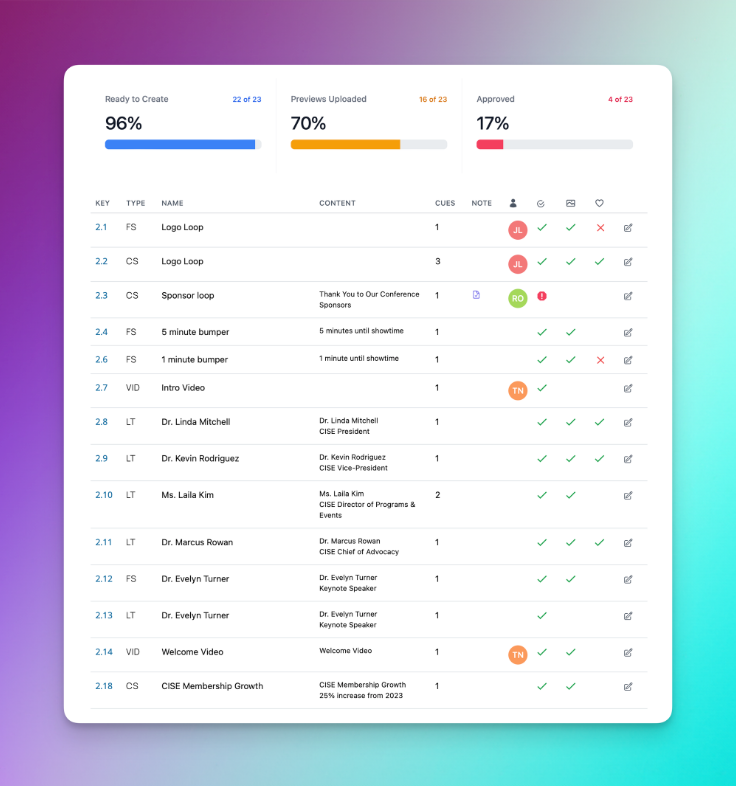
Script Elephant includes a table view, showing the status of each graphic

Client Approval
As event production professionals, it’s always our responsibility to make our clients look their best and represent their brand with integrity. One of the most important ways to do this is to make sure that any inaccurate information, including misspellings or typos are caught and fixed as early as possible.
The first safeguard in avoiding these problems is to make sure that accurate information is entered into the system from the beginning, and that this exact data is then inserted directly into each graphic, without any chance for a designer to inadvertently mis-type information. These work best when your scripting platform supports exporting to programs like Adobe After Effects.
The second safeguard is to allow your clients and stakeholders direct access to see timely drafts of each graphic, to provide feedback, and to approve each graphic as they are ready.

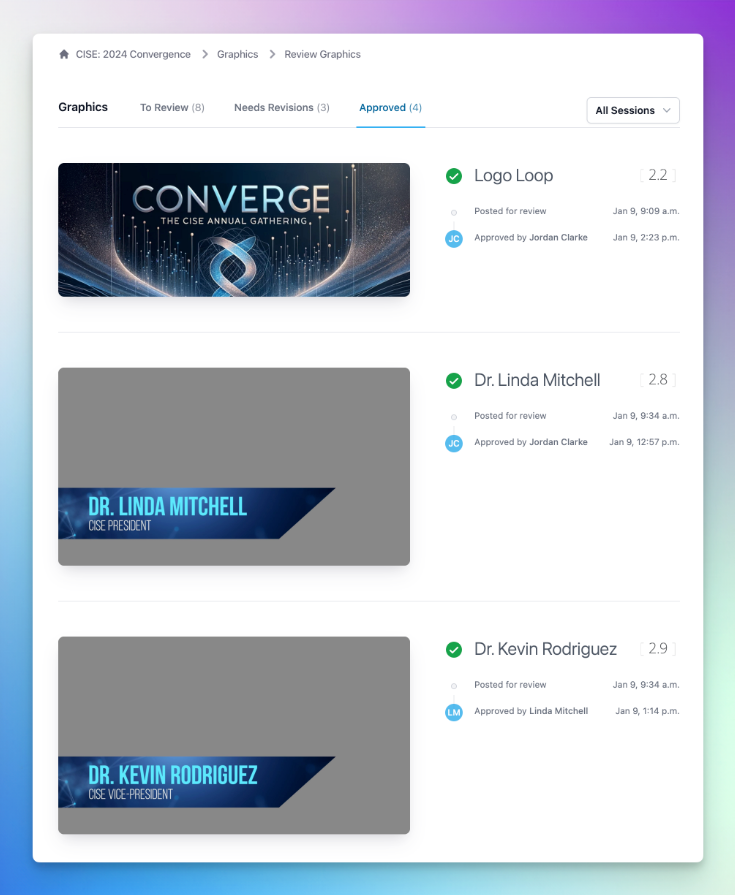
Modern script writing platforms like Script Elephant allow you to invite your clients to your production, and to grant them permission to leave feedback on and approve graphics in real time. Platforms like this help to reduce friction in the approval process, helping everyone feel confident that each graphic looks and reads exactly as intended, long before any audience member walks into the room.
This approval process also establishes a clear historical picture of when previews were first posted, when feedback was addressed, and when each graphic was approved.
All together, these techniques, along with software that incorporates them well, are the key to producing quality graphic content for large-scale productions.
Ready to learn more?
Sign up to get industry insights, trends, and more in your inbox.
Contact Us
We will get back to you as soon as possible.
Please try again later.
SHARE THIS